- Platform fees
- $300.00
- Processing estimate
- $264.00
- Total estimated fees
- $564.00
Sell tickets at the gate
Sell at the gate with Tap to Pay, cash, or the buyer’s phone.
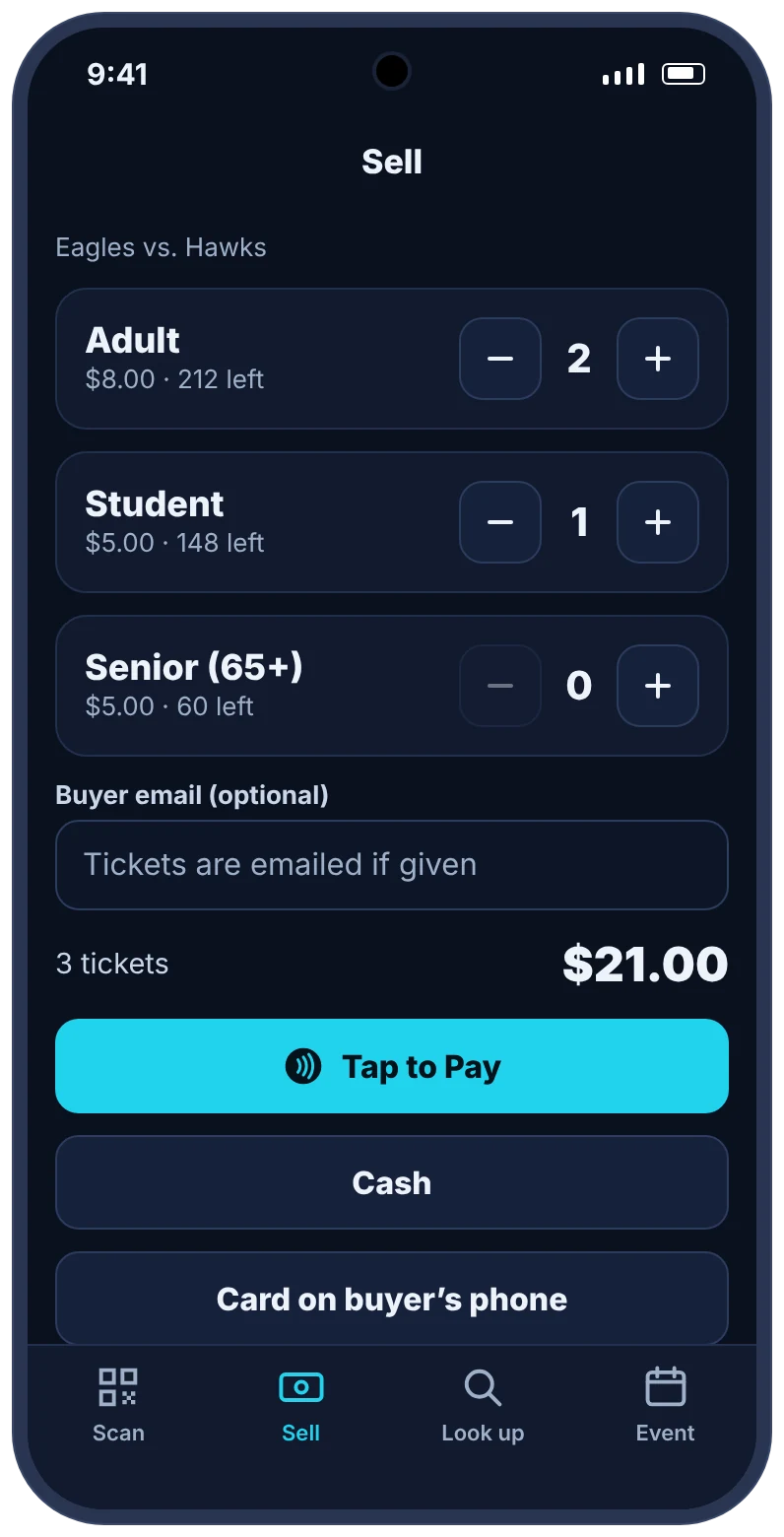
The free TixFlo Game Day app turns gate staff phones into a ticket scanner and a point of sale. Take contactless cards with Tap to Pay, take cash with change worked out, or let buyers pay on their own phone, and every sale stays tied to your event.
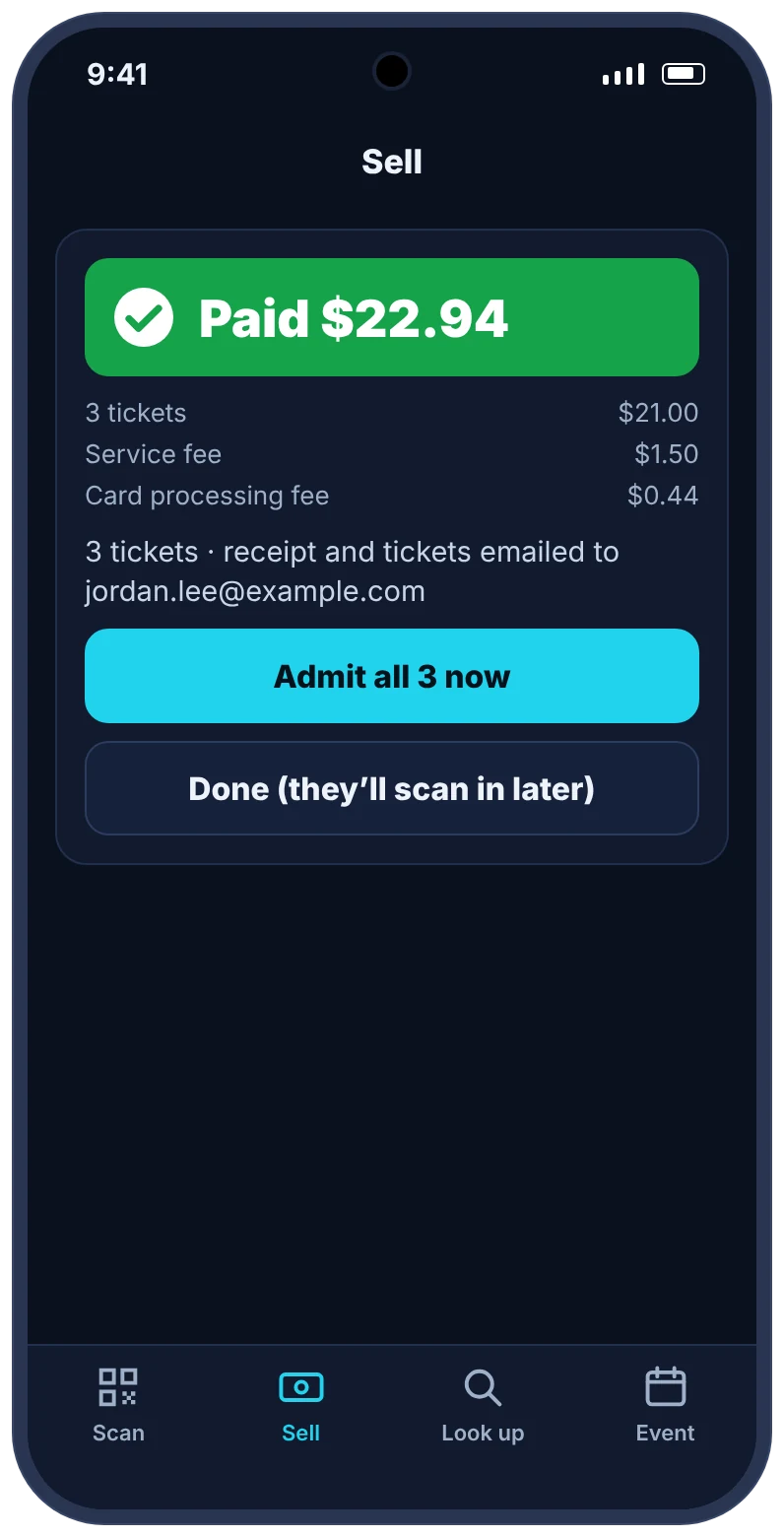
- Tap to Pay on iPhone and Android: take contactless cards, Apple Pay and Google Pay on a staff phone through your Square account, with no card reader.
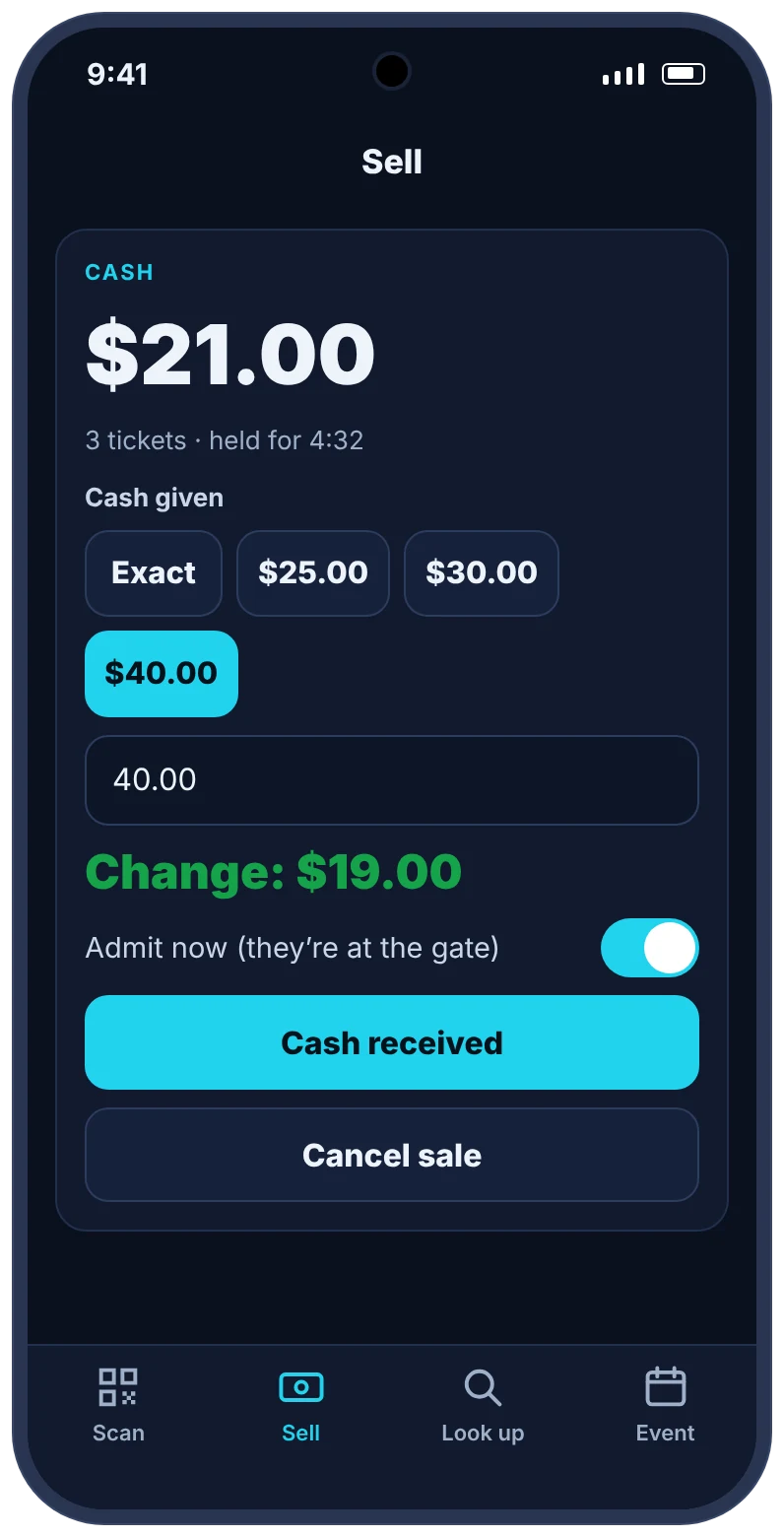
- Cash sales with one-tap bill amounts and change worked out, and no TixFlo fee on cash.
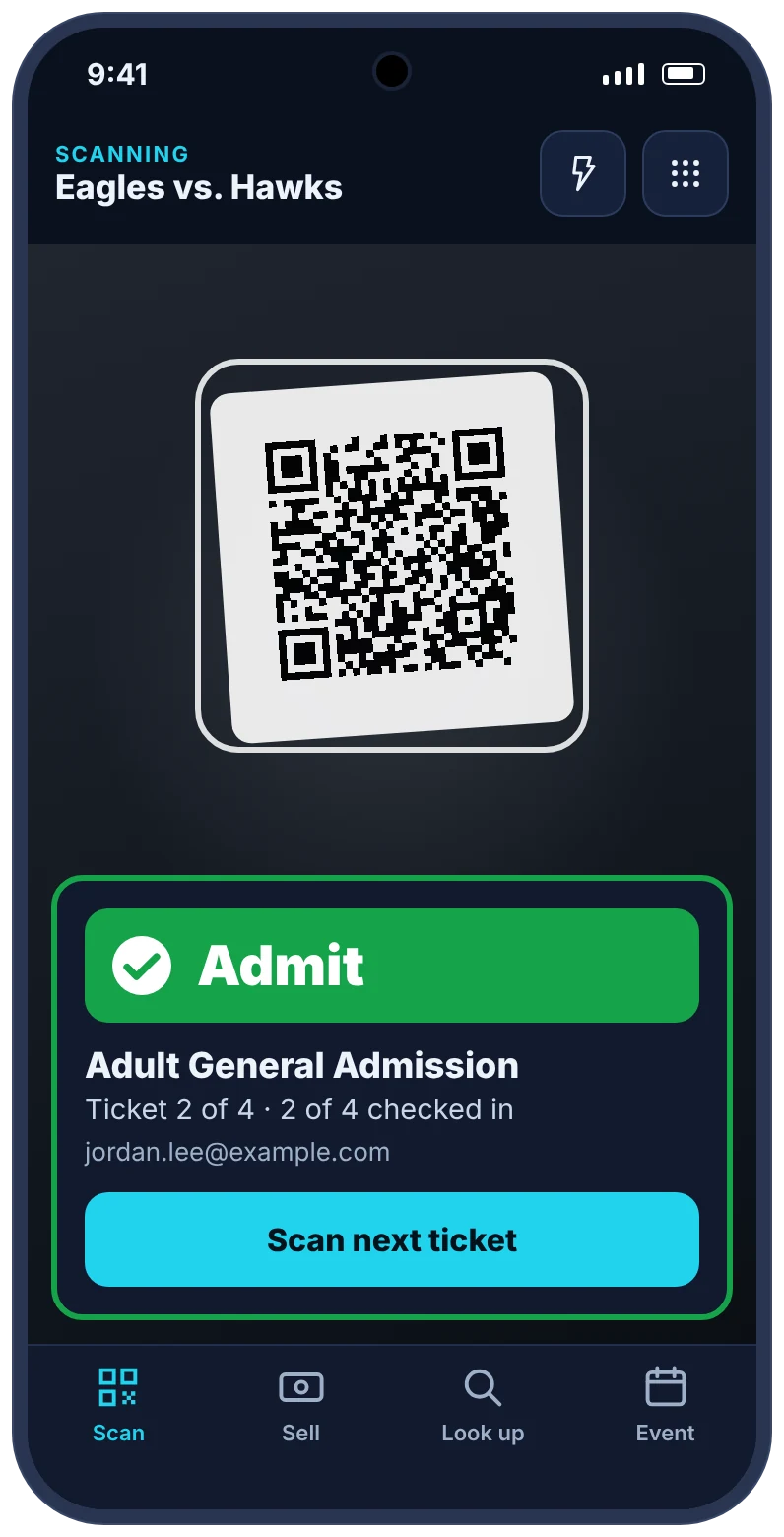
- Gate buyers get QR tickets by email and are scanned in the same way as pre-sold tickets.
TixFlo vs a cash-only gate
Service fee$0.50per paid ticket, plus card processing
Estimated cash-handling costabout $1a ticket + 2%: miscounts, reconciling, extra volunteers
Built for event organizers, school staff, athletic gates, booster volunteers, tournament entrances, venues, and community event teams that need clear checkout, payment-aware QR tickets, and fast front-door scanning.
TixFlo Game Day app
Take payments at the gate with just a phone.
The free Game Day app turns your gate staff’s phones into a ticket scanner and a point of sale. Sell to walk-ups the way they want to pay, and every sale lands in the same event as your online tickets.
- Tap to Pay on iPhone and AndroidTake contactless cards, Apple Pay and Google Pay right on a staff phone, through your Square account. No card reader to buy or charge.
- Cash, with change worked outOne tap for common bills. Cash sales carry no TixFlo fee and still count toward your event totals.
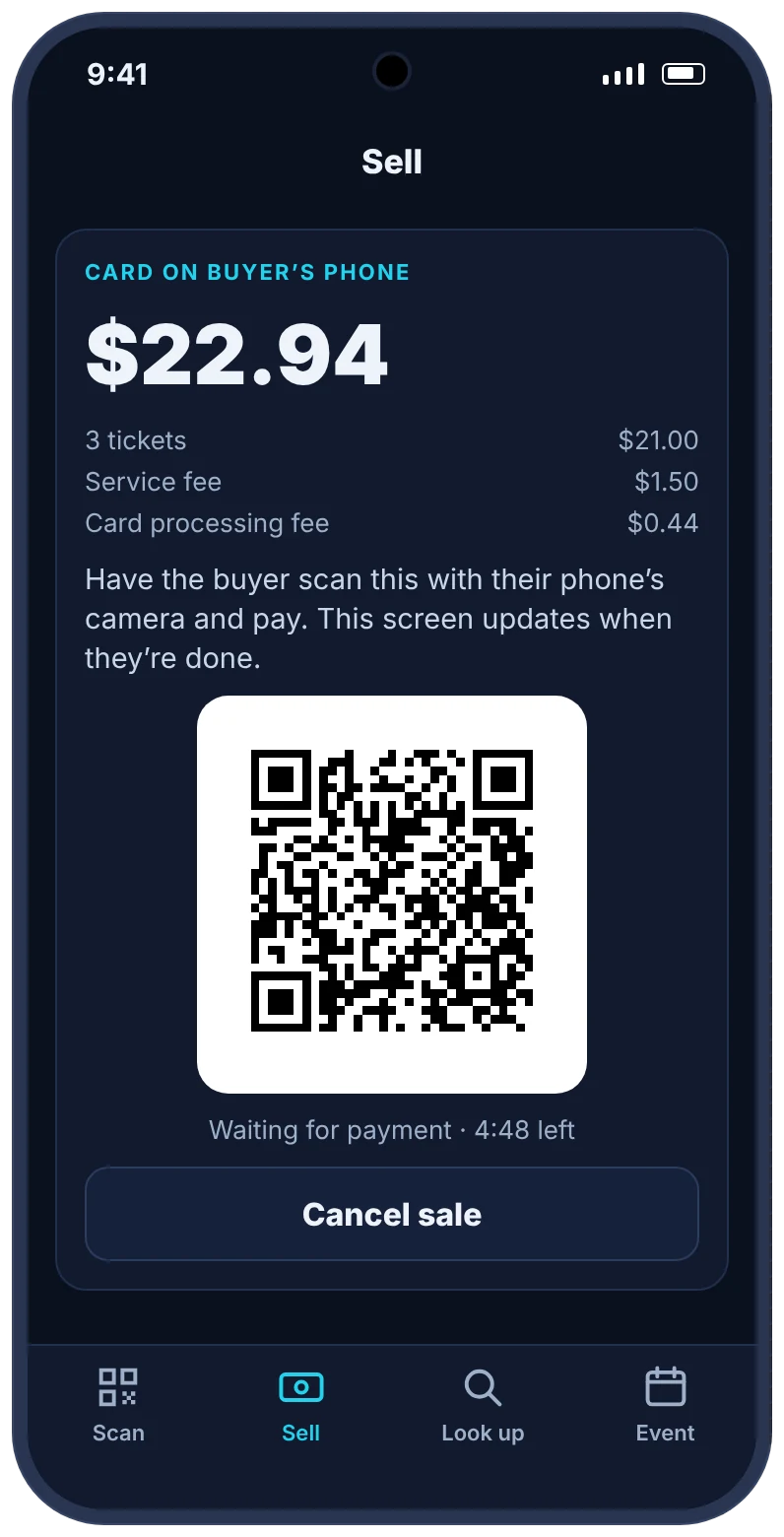
- Card on the buyer’s phoneShow a QR code and the buyer pays on their own phone. Tickets arrive by email the moment they’re done.
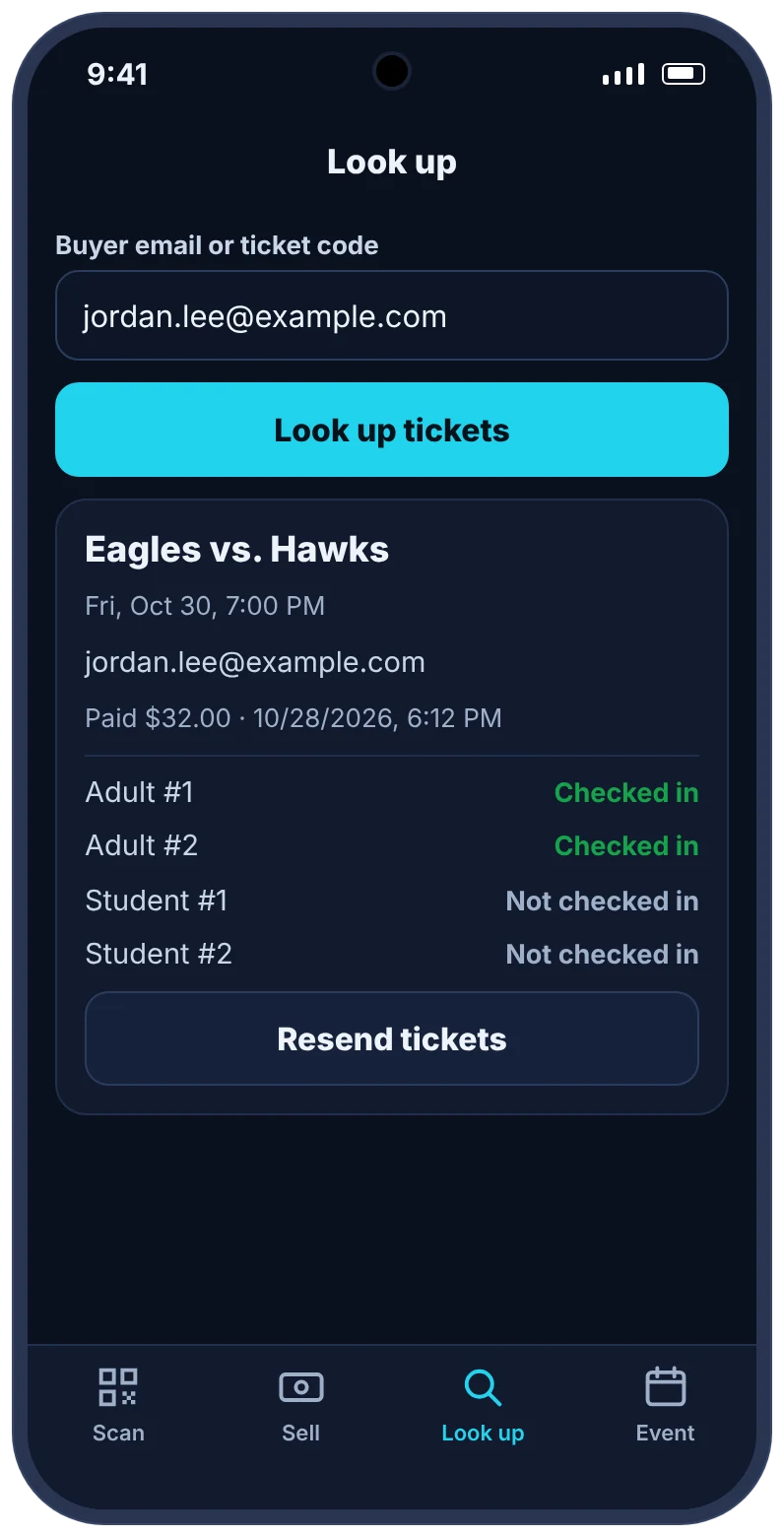
- Scan and look upBig Admit, Already scanned and Not valid results you can read in the sun. Find any order by email and resend tickets.
Coming soon to the App Store and Google Play.
Tap to Pay needs your Square account connected to TixFlo, and an iPhone XS or later or an NFC-enabled Android phone. Apple, Apple Pay and iPhone are trademarks of Apple Inc. Google Pay and Google Play are trademarks of Google LLC.
Detailed comparison
Why TixFlo is a better operational fit for event organizers, school staff, athletic gates, booster volunteers, tournament entrances, venues, and community event teams.
The best ticketing platform is not just the one with the longest feature list. It is the one that protects revenue, makes checkout clear, and helps staff run the door without confusion.
Category
TixFlo
Cash-only gate
Why it matters
Card payments at the gate
Tap to Pay on a staff phone, or a QR code the buyer pays from on their own phone.
Cash-only gates turn away buyers without cash, or need a separate card reader and app.
Many buyers no longer carry cash, and a separate card reader means separate records.
Walk-up payment flow
Buyers can also open the event page from a link or QR sign and pay through hosted checkout.
Cash-only gates require change, cash boxes, and manual tracking.
Long payment conversations slow the line.
Ticket validation
Gate buyers receive QR ticket access after payment and can be scanned like pre-sale buyers.
Manual stamps, wristbands, or verbal confirmations are harder to audit.
The same validation flow keeps entry consistent regardless of when the ticket was bought.
Revenue records
Online gate sales remain tied to the event’s order records and ticket types.
Cash, card readers, payment apps, and notes create separate reconciliation chores.
Organizers need to know what sold at the gate without rebuilding the event from scraps.
Line management
A posted checkout QR can let multiple buyers start payment at once from their phones.
A cash table can only serve as many people as the volunteers can process manually.
Parallel checkout reduces crowding when everyone arrives just before start time.
Sold-out awareness
Ticket availability can be tied to online sales rather than guessed from cash counts.
Manual gates can oversell when multiple entrances or volunteers are involved.
Capacity-sensitive events need reliable availability control.
Interactive revenue calculator
Compare retained revenue after estimated ticketing fees.
Use this calculator to model the organizer-side impact when fees are absorbed by the event. If you pass fees to buyers, the same savings can help lower the final checkout total or make pricing easier to explain.
A cash-only gate isn’t a company and charges no fees. The comparison estimates what cash handling costs an organizer, about $1.00 per ticket plus 2%, from miscounts, reconciling, payment-app exceptions, and extra volunteers. Adjust it to match your gate.
- Cash-handling estimate
- $720.00
- Card processing (none for cash)
- $0.00
- Total estimated cost
- $720.00
Estimated TixFlo advantage$156
Based on 600 tickets at $10.00 each, with roughly 300 orders.
Screenshots
Gate ticket sales in the Game Day app
More of the app your gate staff use on their phones: cash with change worked out, pay on the buyer’s own phone, and finding any ticket in seconds.
Gate sales should not mean messy records
Selling tickets at the gate is unavoidable for many events. Some buyers decide at the last minute, some families arrive with extra guests, and some spectators do not see the event link until they are standing outside. The problem is not walk-up demand; the problem is letting walk-up demand create a separate, messy payment process.
TixFlo helps gate sales stay part of the same event workflow. A buyer can scan a posted checkout QR code or open the public event page, pay through hosted checkout, receive QR ticket access after confirmation, and present the ticket for scanning. The sale is still attached to the event instead of disappearing into a cash count or payment-app memo.
A better alternative to the cash table bottleneck
Cash tables slow down because every purchase happens one at a time. A volunteer explains prices, makes change, writes a note, hands over a wristband, and tries to remember which exceptions were approved. When the rush arrives just before kickoff, curtain, or first pitch, that process becomes stressful.
A checkout QR sign lets multiple buyers begin the payment flow at once from their phones. Staff can focus on helping people who truly need assistance while other buyers complete checkout independently. Once payment is confirmed, the buyer has a QR ticket that fits the same scanner process as every other ticket.
Consistent validation for advance and walk-up buyers
Events get harder to manage when advance buyers, cash buyers, comped guests, and payment-app buyers all follow different entry rules. The door team has to remember too much, and buyers notice the inconsistency. TixFlo reduces that fragmentation by keeping QR validation central.
Whether the buyer purchased yesterday or at the gate, the goal is the same: present a valid ticket and scan it. That makes training easier for volunteers and gives organizers clearer records when questions come up later.
Useful for schools, tournaments, venues, and community events
Gate sales matter at football games, basketball tournaments, school performances, fundraising dinners, community festivals, showcases, and small venue events. In each case, organizers want to capture last-minute revenue without sacrificing control or creating a reconciliation headache.
TixFlo does not force every sale to happen days in advance. It gives organizers a cleaner way to handle late buyers while preserving the benefits of online ticketing: hosted payment, QR delivery, ticket status, and scan records.
Operational wins
Where TixFlo improves the event day experience.
Tap to Pay with no reader
Staff take contactless cards and phone wallets on their own phone, and the sale lands in the event with the buyer’s tickets.
Parallel walk-up checkout
A posted event QR lets multiple buyers start checkout at the same time instead of waiting for one cash volunteer.
Same scan flow for every buyer
Advance and gate buyers can both present QR tickets after payment, keeping door rules consistent.
Less reconciliation cleanup
Gate sales stay tied to event orders instead of being scattered across cash counts and payment-app notes.
FAQ
Questions about choosing TixFlo.
Can TixFlo help sell tickets at the gate?
Yes. Gate staff use the free TixFlo Game Day app to sell tickets with Tap to Pay, cash, or a QR code the buyer pays from on their own phone. Buyers can also use the public event page or a posted checkout QR.
What do I need for Tap to Pay?
Your Square account connected to TixFlo, the TixFlo Game Day app, and an iPhone XS or later or an NFC-enabled Android phone. There’s no card reader to buy.
Does TixFlo charge a fee on cash sales?
No. Cash sales recorded in the Game Day app have no TixFlo fee. Card sales carry the normal per-ticket fee and card processing.
Do gate buyers get QR tickets?
Yes. After payment confirmation, buyers can access QR tickets that can be validated through the scanner flow.
Can this reduce cash handling?
Yes. Online gate checkout can reduce reliance on cash tables, handwritten notes, and payment-app screenshots.
What if some buyers still need help?
Staff can still assist buyers at the entrance, but a checkout link lets many guests complete payment on their own devices.
Ready when your doors open
Sell tickets, deliver QR codes, and check guests in with a smoother flow.
Use the organizer portal to create a test event, connect Stripe or Square, and share a polished ticket page.